
LeadSloth is a Digital Marketing agency that helps B2B technology companies generate sales-ready leads with Inbound Marketing and Marketing Automation. Contact us at info@leadsloth.com or 1-888-4A-SLOTH (1-888-427-5684). More about LeadSloth »

Archive for 'Email Marketing'

Some of you may know that I’ve been a guest blogger at Genius.com since last summer. The main topic has been Marketing Automation, with several other online marketing topics blended in. On the Genius blog I have some nice introductory articles, so I wanted to provide some links to those post here on the LeadSloth blog.

Marketing Automation

These posts are about Marketing Automation and Lead Management:

Demand Generation Best Practices

Where the Marketing Automation posts are more about Marketing Automation systems themselves, these posts are about people and processes:

Lead Scoring

I also wrote a couple of posts that focus on Lead Scoring:

Lead Nurturing

I wrote several posts about nurturing of new, existing or old leads:

Online Marketing

These posts are about various online marketing topics:

Feedback

Feel free to provide some feedback in the comments on this blog, or on the Genius.com blog. I’m interested to learn which topics you’d like to hear more about.

I’m working on an interesting project right now: moving away from a marketing automation system. The plan is to go back to using only Salesforce.com with some cheap add-on tools for email, form submission and data quality. Smart or foolish? I’d love to have your input on the potential pitfalls (and benefits) of this approach.

Background

The company in question has used a comprehensive marketing automation system for about 2 years. In the early days it was used to sift through hundreds of new B2B leads per day to identify the valuable leads. This changed over time: now the focus has shifted to pro-active outreach to a handful of executives, instead of targeting thousands of software developers. In addition to cost savings, the thinking is that a full-blown marketing automation system just makes less sense with the new strategy.

How to Replace a Marketing Automation System?

My first reaction was: no way, you should not want to do without any type of marketing automation system (for simplicity sake, I use this term as synonymous to demand generation and lead management). However, when I started looking into Salesforce.com and the wide variety of add-ons, I was less convinced. The Salesforce.com database has some big issues (e.g. the split between Leads and Contacts), but many 3rd party tools are addressing these weaknesses.

What is easy to replace?

Email marketing that integrates with Salesforce.com is provided by many vendors, like VerticalResponse, Boomerang, ExactTarget, Genius, Lyris and more. There are also some relatively affordable registration form vendors, like FormAssembly and OnDialog. Basic lead scoring features are built into Salesforce.com, and data quality tools are available from vendors like Ringlead, CRM Fusion and Datatrim. Notifications of companies visiting your website are available from Leadlander, Netfactor, LEADSExplorer and DemandBase. You can create reports and dashboards in Salesforce.com to provide analytics. So there are lots of useful add-ons available at a nominal price.

What Is Going to Be Missed…

Some Email Service Providers can send email on behalf of the record owner or can handle drip-campaigns, but those are exceptions and you sometimes pay quite a bit more for these advanced features. Unsubscribe handling is typically done via a generic page, rather than via branded page.

If you use a basic form vendor, you have to manually map the fields, and put the form on a landing page yourself. You may want to pre-fill the form, or send a thank-you email or the start of an email drip campaign: this is not always possible. Also, some form vendors are not able to append to existing records (resulting in duplicates) or to link new registrations to a Salesforce.com campaign.

Lead scoring based on attributes (e.g. job title) is built into Salesforce.com, but that does not include activity-based scoring, such scoring based on website visitors, clicks on links in emails or form submissions.

Even though you can get reports on anonymous visitors via stand-alone tools, it’s much more work to set up notifications of website visits by known users, and even more challenging to sync that information with Salesforce.com.

Then there are specific usage scenarios that are automated in a marketing automation system, such sending a reminder to non-registrants for an event: with the new approach this needs to be done manually, which takes a lot more time.

Most marketing automation systems replicate the Salesforce.com database with their own database: in the new situation everything is stored in Salesforce.com (or at least: that’s the goal). That is great for manageability, but – if you have the habit of qualifying leads before sending them to the CRM system – you now have a database full with unqualified leads.

What Is Your Take?

This project is still in the planning phase, so I’m still compiling a list of all the pros and cons. One thing is sure: in the new situation the monthly cost will be about $200, down from well over a thousand dollars. That is a significant savings.

But how much more time will it cost to manage the new situation? Are there specific features that create revenue, but simply cannot be implemented with the new approach. What is your take on this?

From Web Analytics to Demand Generation

ActiveConversion first became known for its sales-focused Web Analytics, such as identifying companies that visit your website (similar to Leadlander). Therefore I initially called them a ‘niche vendor’. However, the product has evolved into a fairly complete marketing automation suite for SMB companies. So the people behind ActiveConversion gave me a demo to show they are more than a niche player.

Anonymous Visitor Identification

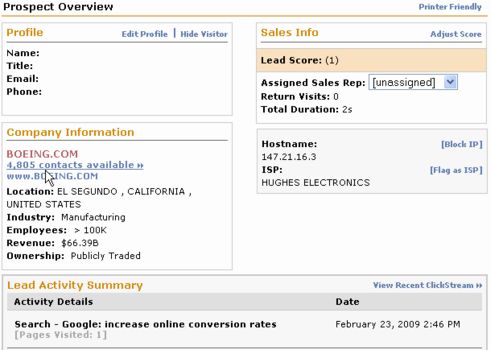
ActiveConversion provides reports on anonymous website visitors: they show the company name and activity. It integrates with Jigsaw to show company details like revenue, and available contacts for a specific company: contacts can be bought for $1 each directly at Jigsaw.

There are two ways to identify visitors:

  • They fill out a form on your website
  • They click on a link in an email that you sent them

After that, the (previously anonymous) website sessions are linked to a specific person.

anonymous prospect information by ActiveConversion and JigSaw
An anonymous prospect record

Lead Scoring

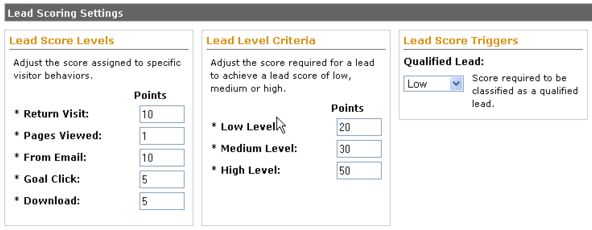
Lead scoring works for both anonymous and known visitors: for anonymous visitors the triggers for increasing the lead score are somewhat limited, essentially page views and return visits. For known visitors you can also track clicks from emails you sent them. It’s fairly basic compared to some of the more expensive systems, but effective and easy to use.

activeconversion lead scoring settings
Lead scoring configuration

Form builder

The form builder works different from some higher-end systems that actually host the entire landing page for you. ActiveConversion generates HTML code for you, so you can include it in a page on your own website. As far as I understand it, it uses the JavaScript tracking code (installed for Web Analytics) to also read the form data and save it in the ActiveConversion database, rather than using a traditional form submission. It can also integrate with Salesforce Web-to-Lead forms.

Email marketing

ActiveConversion supports both one-time emails to a segment of the database, as well as drip emails that are triggered after a prospect registers. By default it uses VerticalResponse as the underlying email system, fully integrated in the ActiveConversion user interface. However, customers can also use any of the 10 ESPs that they have integrated with.

Salesforce.com integration

ActiveConversion also integrates with Salesforce.com, although using Salesforce is not a requirement. Typically, new leads are assigned to sales person before they are copied to Salesforce.com: the assignment rules are flexible. Also, when a visitors registers, ActiveConversion will check in Salesforce if that email address is already present, to avoid duplicates. So there is data exchange on demand, but not a full bidirectional synchronization like in most of the more expensive lead management systems. The visitor activity is also exported to Salesforce.com and shown in the lead record (see screen shot).

activeconversion salesforce integration
Website sessions are added to the salesforce.com Lead record

Marketing & Web Analytics

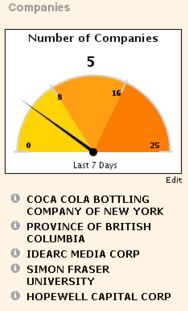
The marketing reporting features allow you to monitor performance of various marketing activities. There are several reports including reports on qualified contacts and website visits as a result of emails, pay-per-click campaigns and other online advertisements. Several reports can also be emailed on a daily or weekly basis.

companies identified by activeconversion
Report on the companies that visited the website in the past 7 days

Basic web analytics is also included, so many customers don’t use additional web analytics. Only customers with specific conversion tracking (e.g. e-commerce websites) typically use a dedicated web analytics product such as Google Analytics.

Conclusion

Based on the demo I attended, I feel that ActiveConversion is a good first B2B demand generation solution for smaller companies. It is easy to use, it has significantly more features than Leadlander (which is cheaper and narrower in scope), it is a notch up from InfusionSoft (which focuses on the smallest companies), and it is cheaper than most other Demand Generation vendors.

If you’re looking for an entry-level B2B lead management solution, check out their 30-trial. If you’ve verified that it has all the features you want, you get excellent value for money, starting at $250 per month.

Have you worked with ActiveConversion? Please leave a comment or email me with your experiences.

marketingsherpa logo Today MarketingSherpa’s Email Summit started in Miami. It is focused on advanced email strategies, which is an important part of the demand generation process. Most of the case studies seem to be B2C rather than B2B. The focus is on list- and trigger-based emails and on landing pages, rather than on the full Lead Management Automation functionality. Nevertheless, there are lots of interesting advanced email topics that are just as relevant for B2B demand generation specialists.

Unfortunately I can’t be there, but there is live coverage via Twitter.

Some highlights from the agenda:

Email Strategies

  • Using email in conjunction with social media campaigns
  • Combining List- and Trigger-Based Campaigns
  • Using direct mail with dynamic printing to recover email addresses

Email Analytics

  • Integrating web & email analytics for better conversion
  • Using Artificial Intelligence to predict prospect behavior

Email design

  • Leveraging user-generated content
  • Mobile email marketing
  • Cross-channel: using SMS and instant messaging

Landing page design & Personalization

  • Post-click personalization based on the “wisdom of the masses”
  • Optimization by focusing on specific actions

Testing

  • Using multi-variate testing to optimize conversion and sales
  • Using Email Control Groups for cost justification

Stagnant email service providers becoming irrelevant? (see conclusion)

In a previous post there was a lively discussion about the terms Demand Generation and Lead Management Automation (LMA) systems. The consensus was that Lead Management System is part of the demand generation process, and focuses on managing leads you already have in your database (and capturing/importing new leads). Some example features:

  • building landing pages and registration forms
  • tracking the source of leads
  • collecting as much information as possible (web & data analytics)
  • nurturing via email and other channels
  • calculating a lead score until the prospect is sales-ready

But how does that compare to email marketing, web analytics and landing page optimization tools? In talking to several marketing managers, they often asked: “How do LMA systems compare to {fill in any other marketing software}”. In the next paragraphs I compare LMA systems with other popular marketing systems, and I hope to go more in-depth in future posts.

Email Marketing

Lead Management Systems can send out batch emails to a list, similar to Email Services Providers (ESPs) like VerticalResponse, ExactTarget and Constant Contact. Interesting enough, I’ve heard of several companies that still use ESPs in addition to their Lead Management System, not sure why. Let me know if you have ideas.

Lead Management Systems also provide lots of advanced email features, such as drip-marketing, event-based emails, heavily segmented and personalized emails (e.g. sent from the account of the responsible sales person), and event reminder emails. However, ESPs are also moving forward, and for example ExactTarget now also offers drip-marketing support.

Data Management

Some demandgen vendors provide data management features for deduplication and normalization. My personal opinion is that these features are usually somewhat limited, and that they’re not mature enough to replace specialized data cleaning solutions (Ringlead, DemandTools). But that may change soon, as LMA vendors keep expanding their offerings.

Web Analytics

All Lead Management Systems offer some kind of web analytics, mostly focused on marketing metrics. Only LMA systems aimed at smaller companies tend to offer generic web analytics (page views, referrers, etc.). In all other cases, you would still need a general-purpose Web Analytics systems, such Google Analytics, Coremetrics, Omniture or WebTrends.

There are also some specialized Web Analytics vendors that identify the company name of anonymous leads (Leadlander) or website activity for known leads (Genius.com). However, more and more LMA systems include this functionality. It ranges from fairly basic (Market2lead) to more comprehensive (Marketo, Genius Enterprise, ActiveConversion, LeadGenesys, Pardot).

Web Content Management

Lead Management Systems also do not replace Web Content Management systems, although it may be more common to have WCM features in Demand Generation in the future (earlier post). The only web pages they currently manage are landing pages or microsites. Those are usually hosted on a subdomain such as http://marketing.company.com. There are some exceptions: both Marketbright and Marqui include a full WCM system.

Landing page optimization & Website Personalization

An area where many Lead Management Systems can still improve is landing page optimization. In my opinion they should offer more features to optimize landing page conversion, which critical for Search Marketing efforts. There are dedicated vendors with a superior feature set, such as ion interactive, magnify360 and Sitebrand.

I’ve heard some vendors thinking about personalizing offers based on behavior of anonymous visitors to make it more likely that they register for an offer. Currently I’m not aware of any LMA vendors that offer this functionality: let me know if you know more about this…

Search Marketing

Search Engine Optimization and Pay-per-Click management are usually not included in Lead Management Systems. At most, LMA systems provide reporting on the lead source (which keywords, and organic search or PPC). It looks like SEO and PPC management will stay separate from Lead Management for the short to medium term. Personally I expect this will be integrated in the long term, as lead acquisition and lead management naturally complement each other, and cover the entire demand generation cycle.

Conclusion

Lead Management Automation vendors are rapidly expanding their functionality, but will not replace all specialized tools any time soon. I think we’ll see a consolidation of the industry of the next couple of years. Specialized vendors need to keep innovating, otherwise they will falter. Some categories are there to stay, such as Web Content Management and Web Analytics, but each will also expand their marketing automation features.

I’m not sure about Email Service Providers: In my opinion they either need to move towards lead management or become irrelevant. ExactTarget, Lyris and Silverpop are on the move, but VerticalResponse is at risk: even for small companies there are more effective lead management solutions (such as InfusionSoft).

What do you think: is there a future for pure-play ESPs?

Today Genius.com launched their new Genius Enterprise product. It adds automated lead nurturing, real-time lead conversions, and lead scoring to its existing email marketing solutions.

Genius.com Product Suite

Genius.com is well-known for its sales notification product, SalesGenius. It allows sales people to send personalized emails to their prospects and monitor their response in real-time. The Genius Tracker – sort of an instant messaging client – gives immediate alerts if prospects visit the company’s website. Sales people can sign up individually, without having to involve the IT department.

Last year Genius.com introduced MarketingGenius, which allows marketing departments to send emails on behalf of the sales people. Again, the responsible sales person is notified of click-throughs via the Tracker.

The Enterprise product that is launched today extends this offering with lead nurturing and lead scoring. Now Genius.com is one step closer to becoming a viable competitor to more established marketing automation solutions, so I’ve added them to my list of Demand Generation systems.

Genius Enterprise

With the existing products emails are sent by a sales person or by the marketing department. With Genius Enterprise there can be lots of different events that trigger the sending of an email. Let’s take a quick peak at the new product:

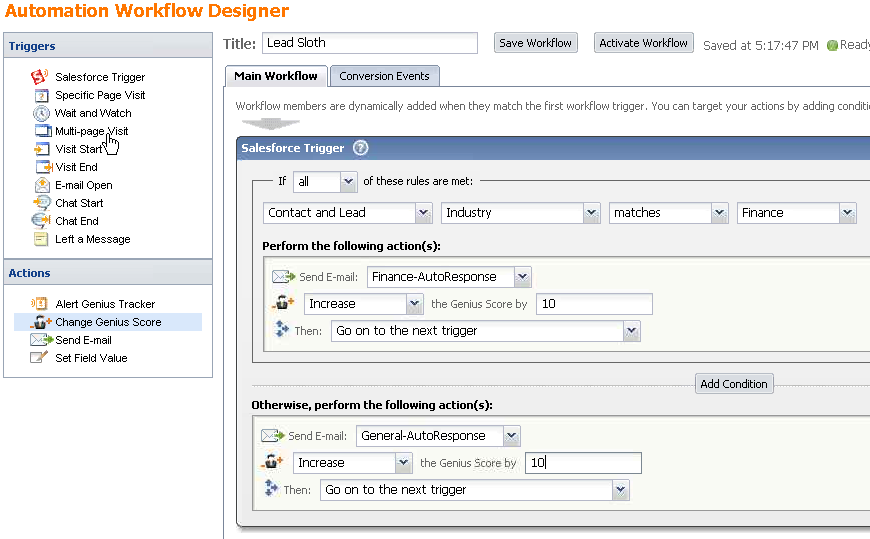
genius-workflow-designer

The Genius Enterprise Workflow Designer

The screenshot shows that many events can start a workflow: a change in Salesforce.com, a website visit, an email open or the passage of a certain amount of time. Based on that, additional emails can be sent, the lead score can be updated or the responsible sales person can be alerted. For a more detailed review, see David Raab’s write-up.

Genius.com expects that this product will especially appeal to mid-side to large organizations. Most will use this together with the SalesGenius product. Pricing starts at $18,000 per year, including 5 SalesGenius seats.

How does Genius Enterprise Compare?

Many new customers will upgrade from Email Service Providers that don’t provide the real-time tracking and lead nurturing features. The closest competitor in this area may be ExactTarget, which offers email nurturing functionality.

Also, many companies will compare Genius.com with established Demand Generation products such as Eloqua. Genius does not provide some typical demand generation features, such as landing pages or microsites. However, not every company may need that. And Genius clearly has an edge in several areas:

  • quick implementation with no IT involvement
  • ease of use
  • marketing & sales collaboration
  • instant response
  • real-time salesforce.com integration

Conclusion

If your first priority in Demand Generation is to make better use of email campaigns to nurture prospects, and to foster sales & marketing collaboration, Genius Enterprise is an excellent choice. If you need other demand generation features like landing pages, you should compare it with full-featured demand generation products.

PS. Genius.com will be at the Sales 2.0 conference, this Wednesday and Thursday in San Francisco (4 & 5 March 2009). Stop by for a demo.

While the stock market tanks, the Demand Generation and Marketing Automation markets are gearing up. This week both LoopFuse and Genius.com published very positive news.

Genius.com: 200% revenue growth

genius.com logoGenius.com reports 200% revenue growth and a 50% increase in new customer acquistions (that’s a typo from their press release). I assume that means they’ve also increased revenue per customer, most likely because they are now selling MarketingGenius, which is an email marketing tool, which sells at a higher price point than the existing SalesGenius product (for individual sales people).

Genius.com now has over 50,000 Genius users, in over 100 countries worldwide. That is impressive. However, their core functionality (tracking of prospects’ website activity) is now also offered by Marketing Automation systems as part of a bigger offering. So I wouldn’t be surprised if Genius.com will continue to expand their offerings.

Loopfuse: Series A funding

loopfuse logoLoopfuse, a provider of open source marketing automation and email marketing solutions, has raised around $1.4 million in Series A funding led by True Ventures.

The only thing I know about them is that many of their customers are themselves open source software companies, such as Acquia, the company behind the Drupal Content Management System. As a matter of fact, Drupal is now integrated with LoopFuse. With the integration Loopfuse tags are automatically added to Drupal pages, and Drupal web forms are submitted into LoopFuse (at least, that’s what I understand based on the press release). I’d love to learn more about this system. Let me know your feedback or testimonials.

In any case, the LoopFuse people must be in euphoria after this news, at least based on the (somewhat cocky) comment on their blog:

“To Marketo and their overpriced Toy for Marketing Tots™, and Eloqua, with their Techological Torture Device™, I say, Get some coffee and try to stay awake. If it was bad for you when it was two guys (and a dog), it’s going to be an utter nightmare now.”

Tough times ahead?

You’d say that the good times must be ending some time? Or will marketing automation be the positive exception? Will Genius.com and Eloqua go IPO in 2010? That would really put the demand generation space on the map.

Today I had a meeting with a representative of Zoomio, a European marketing automation vendor that started in Denmark in 2002. I was curious to learn about their solution, because I’ve heard of Eloqua, Market2Lead, Marketo, and a whole bunch of other demand generation vendors, but never of Zoomio.

Zoomio Marketing Automation

It turns out that Zoomio is mainly doing business in Northern Europe, but they do have 600 customers and 75 employees, so they’re larger than most US-based demand generation vendors. Most US-based vendors have at least half of their customers in the technology sector, but not Zoomio: they have customers across all industries: from travel agencies to car dealerships to software companies.

Their strength is in the definition of the interaction process: they have a flow chart that defines the touch points, which includes call centers and text messaging. Another neat feature is the split in an easy UI for marketers and an advanced UI for marketing specialists. However, they do not support typical B2B features such as lead scoring and Salesforce integration.

We really need those features, so it isn’t a great solution for us. But when they decide to offer lead scoring and a Salesforce integration I will definitely look at them again: especially since their pricing is quite attractive. By that time I hope they also offer US-based support, because currently it’s only offered in mainland Europe.

I’m curious to learn more about Zoomio from actual users: if you use Zoomio, please leave a comment below with some feedback on how you like Zoomio.